Job Management & Customers
Jobs, customers and the fleet, finally in one app
Assign jobs to drivers and vehicles, keep customer records, and run the day from the same app that runs the fleet.
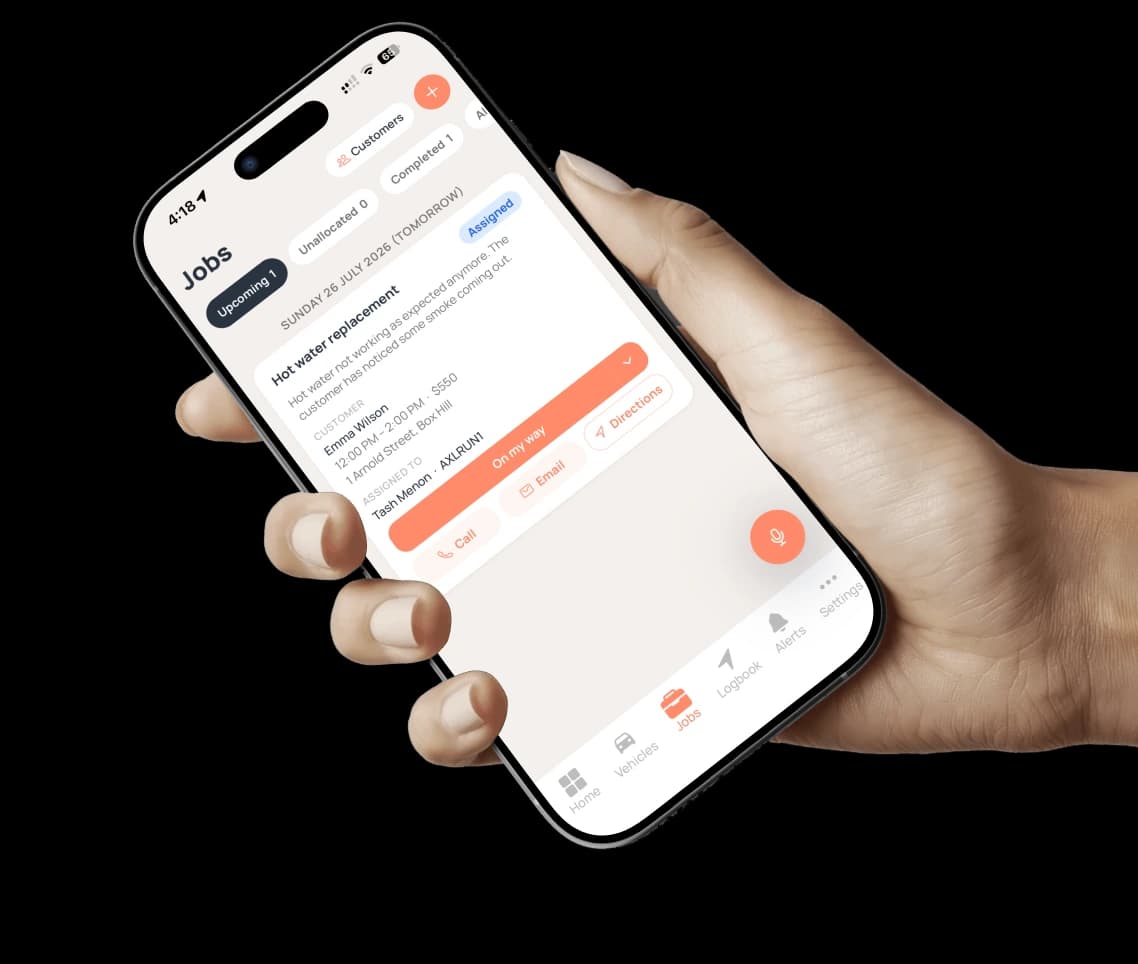
Most small fleets run jobs in one app, customers in another and the vehicles in a spreadsheet. Axlerun puts them together: every job carries its customer, time window, price and address, and is assigned to a driver and a vehicle. The driver moves it forward one button at a time, the customer hears when the driver is on the way, and on Turbo they can watch the arrival on a tracking link.
Available on

 Cruise & Turbo· jobs and customersTurbo· customer SMS and tracking link
What you get
Seven stages, one button each
A job moves from Draft to Scheduled, Assigned, En route, Arrived, In progress and Completed, with Cancelled as the way out. The driver drives it forward with one button at each step: On my way, I've arrived, Start job, Mark complete. An admin can cancel a job that has not finished, with a reason that stays on its history.
Assign with a clash warning
Allocate a job to a driver and vehicle pair. Each row shows whether that driver's day is free, how many jobs they have, or an Overlap warning if it clashes. Reassign or pull the driver back any time before the job starts.
Customers built in
Customer records with name, phone, email and address, so booking a job is a couple of taps and call, email and directions are one tap away on the job.
The customer hears from you, automatically
An email when the job is assigned, when the driver is on the way and when they arrive, on by default. On Turbo, an SMS on the way and on arrival as well.
A tracking link on Turbo
Add a secure link to the customer's messages and they see the job's status and the driver's position on the way, on a page of their own, without an app.
Notes that stay on the job
Owners and admins add commentary with attachments to any job, kept internal or shared with the customer. A customer's reply comes back onto the same job instead of into someone's inbox.
How it works
STEP 1
Create the job
Customer, title, time window, price, site address and notes, in one form. A job without a date stays a draft until it has one.
STEP 2
Assign driver and vehicle
Pick the pair from your active allocations. Overlaps warn; they do not block you.
STEP 3
Run the day
The driver taps through the stages from the phone. The customer gets the emails, and on Turbo the SMS and the tracking link.
See how it fits the rest of the platform on the Features & Pricing page.
Related
Common questions
About Job Management & Customers
Still have questions?
Contact
Available Now
Start managing your
fleet today
Your first 3 vehicles are free, forever.


Already a customer? Sign in on the web
app.axlerun.com.au