Pool Vehicle Bookings
Shared vehicles, booked like meeting rooms
Drivers book a pool vehicle ahead, scan the windscreen QR to take it, and bring it back with the odometer. You see who has what, all day.
A shared ute run on a whiteboard and a key hook works until two people need it at 8am. Axlerun turns your shared vehicles into pools drivers can book: they pick a time, see which vehicles are free, check out by scanning the QR sticker on the windscreen and check in with the odometer when they're done. Managers run the day from a calendar, rules keep bookings sensible, and utilisation tells you whether the pool is the right size.
Available on
 Turbo
Turbo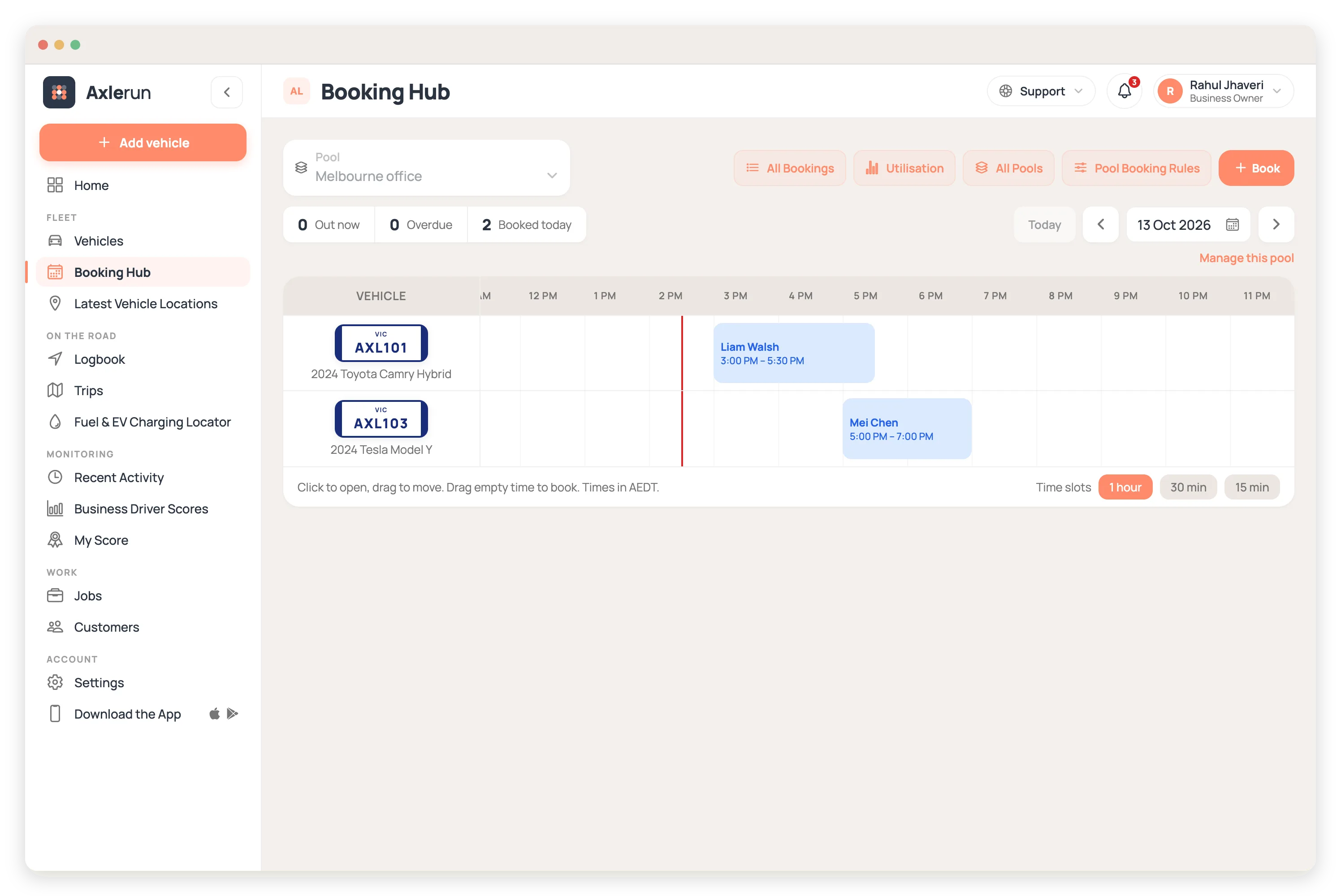
What you get
Book ahead, see what's free
Drivers pick a pool, a start and an end, and choose from the vehicles free for that time. Tags such as ute, tow bar or seats 7 show under each plate, so the right vehicle goes to the right job.
Scan to check out
Each vehicle has its own QR sticker. Drivers scan it in the app to take the vehicle and scan again to bring it back. Lose a sticker and you rotate the code, so the old one stops working.
Rules that run themselves
Booking hours, weekends, how far ahead, longest booking, bookings per driver and a turnaround gap to clean and refuel. Set them once in Booking Rules and every booking is checked against them before it saves.
No-shows and late returns handled
A booking nobody collects can cancel itself after a grace period. A vehicle that's late back reminds the driver and tells the manager. Running Late moves the due-back time in two taps, after checking the next booking is clear.
A calendar you can drag
On a computer, the pool is a calendar with vehicles down the side and the day across. Drag a booking to move it, drag an edge to change its length, and confirm. The driver gets an email saying what changed and who changed it.
Know if the pool is the right size
Utilisation compares booked hours with the hours the pool is open, beside hours out, distance, no-show rate and peak concurrent use. If peak use never reaches the size of the pool, you have a vehicle to spare.
The driver's half of it
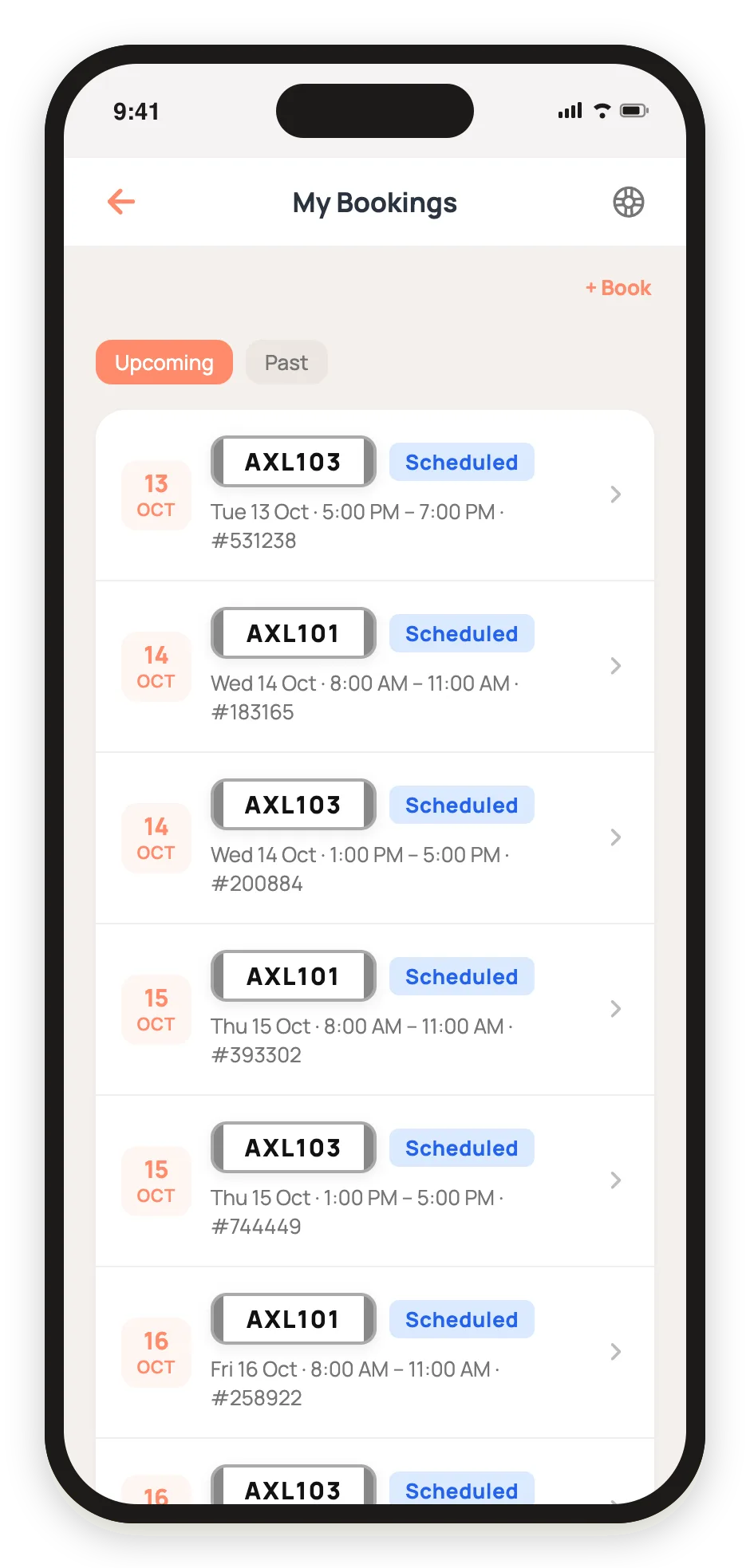
Drivers never open a calendar. My Bookings lists what they have coming, each with its plate, its times and its booking number, and the next one sits on the home screen ready to scan at the vehicle.

How it works
STEP 1
Set up the pool
Add the vehicles, the drivers who can book them and the admins who run it. Print the QR stickers and fit them to the windscreens.
STEP 2
Drivers book and scan
They book from the phone, scan the sticker to check out, and check in with the odometer, fuel and cleanliness if you ask for them.
STEP 3
Run the day
Watch what's out and overdue, move bookings on the calendar, approve odometer readings that look wrong, and check utilisation at the end of the month.
See how it fits the rest of the platform on the Features & Pricing page.
Related
Common questions
About Pool Vehicle Bookings
Still have questions?
Contact
Available Now
Start managing your
fleet today
Your first 3 vehicles are free, forever.


Already a customer? Sign in on the web
app.axlerun.com.au